Custom Waveforms#
If std_fn_lib does not contain the waveforms you need, custom ones can be added through usr_fn_lib - the “user-editable” library.
This requires writing a minimal amount of Rust code and re-compiling the package from source. This tutorial explains how to write the waveform code while installation instructions provide a step-by-step guide on how to re-compile.
Start by following installation instructions. Once you get nistreamer-usrlib source code, open nistreamer-usrlib/src/lib.rs - this is where we will be writing custom waveforms.
Minimal example#
Consider a simple example - we want to add the following function:
MyLinFn(t) = slope*t + offs
Time units are always second and result units are always Volt. So slope has units V/s and offs is in V.
This is what should be added in nistreamer-usrlib/src/lib.rs:
/// My linear function:
///     `MyLinFn(t) = slope*t + offs`
#[usr_fn_f64]
pub struct MyLinFn {
    slope: f64,
    offs: f64,
}
impl Calc<f64> for MyLinFn {
    fn calc(&self, t_arr: &[f64], res_arr: &mut[f64]) {
        for (res, &t) in res_arr.iter_mut().zip(t_arr.iter()) {
            *res = self.slope * t + self.offs
        }
    }
}
Tip
You can use this snippet as a template.
Breakdown#
(1) Define a struct to contain parameter values:
pub struct MyLinFn {
    slope: f64,
    offs: f64,
}
(2) Implement Calc<T> trait for this struct. In essence, Calc<T> contains the formula of your waveform expressed as the following function:
fn calc(&self, t_arr: &[f64], res_arr: &mut[T]) { ... }
which takes a row of time points t_arr and stores computed signal values in res_arr. Parameter T stands for the signal sample type - use f64 for AO and bool for DO. For our example, it looks like this:
fn calc(&self, t_arr: &[f64], res_arr: &mut[f64]) {
    for (res, &t) in res_arr.iter_mut().zip(t_arr.iter()) {
        *res = self.slope * t + self.offs
    }
}
where the for-loop iterates over both res_arr and t_arr together and
*res = self.slope * t + self.offs
is our linear function formula.
(3) Attach #[usr_fn_f64] attribute to your pub struct .... This is actually a procedural macro which reads the contents of your struct and writes additional code based on that. You can find details here if you want to learn more.
Use #[usr_fn_bool] for DO waveforms instead.
(4) Optionally, add a documentation comment right above pub struct ... (order with #[usr_fn_f64] doesn’t matter). Each line should start with ///. This comment will be converted into the Python docstring of your waveform.
Access and use#
Once you have added the waveform to nistreamer-usrlib/src/lib.rs and re-compiled the package (see instructions), you can access it in usr_fn_lib and use it just like built-in waveforms:
from nistreamer import NIStreamer, std_fn_lib
ni_strmr = NIStreamer()
ao_card = ni_strmr.add_ao_card(max_name='Dev2', samp_rate=1e6)
ao_chan = ao_card.add_chan(chan_idx=0)
from nistreamer import usr_fn_lib
usr_fn_lib.MyLinFn?
Signature: usr_fn_lib.MyLinFn(slope, offs)
Docstring:
My linear function:
`MyLinFn(t) = slope*t + offs`
Type:      builtin_function_or_method
ni_strmr.clear_edit_cache()
ao_chan.add_instr(
    func=usr_fn_lib.MyLinFn(slope=1.0, offs=-2.0),
    t=0, dur=4.0, keep_val=False
);
Default values#
You can provide default parameter values by specifying full function signature as macro argument:
/// My linear function:
///     `MyLinFn(t) = slope*t + offs`
/// `offs` is optional and defaults to `0.0`
#[usr_fn_f64(slope, offs=0.0)]  // <-- notice this change
pub struct MyLinFn {
    slope: f64,
    offs: f64,
}
usr_fn_lib.MyLinFn?
Signature: usr_fn_lib.MyLinFn(slope, offs=0.0)
Docstring:
My linear function:
    `MyLinFn(t) = slope*t + offs`
`offs` is optional and defaults to `0.0`
Type:      builtin_function_or_method
ni_strmr.clear_edit_cache()
ao_chan.add_instr(
    func=usr_fn_lib.MyLinFn(slope=1.0),  # <-- leaving `offs` at default
    t=0, dur=1.0, keep_val=False
);
Note
The argument of #[usr_fn_f64( ... )] must contain all struct field names and precisely match their order.
Note
The argument of #[usr_fn_f64( ... )] must meet the rules of both Rust and Python. In particular:
Floating-point values must contain decimal dot (
1.0instead of1);Non-default arguments must go first;
trueandfalseshould be lowercase.
Math library#
Rust standard library provides most mathematical functions as methods of f64 type (reference). Constants are in std::f64::consts module.
use std::f64::consts::PI;

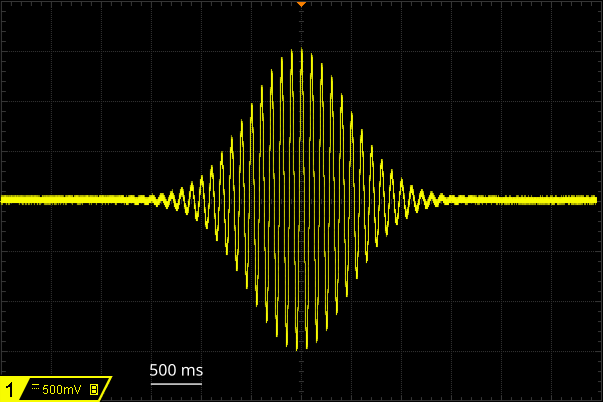
/// Sine pulse with a Gaussian envelope:
///     `GaussSine(t) = amp(t) * sin(2*PI*freq*t + phase)`
/// where
///     `amp(t) = amp * exp(-(t-t0)^2 / 2*sigma^2)`
#[usr_fn_f64(t0, sigma, amp, freq, phase=0.0, offs=0.0)]
pub struct GaussSine {
    t0: f64,
    sigma: f64,
    amp: f64,
    freq: f64,
    phase: f64,
    offs: f64,
}
impl Calc<f64> for GaussSine {
    fn calc(&self, t_arr: &[f64], res_arr: &mut [f64]) {
        let denominator = 2.0 * self.sigma.powi(2);
        for (res, &t) in res_arr.iter_mut().zip(t_arr.iter()) {
            let amp = self.amp * f64::exp(
                -(t - self.t0).powi(2) / denominator
            );
            *res = self.offs + amp * f64::sin(2.0*PI*self.freq*t + self.phase);
        }
    }
}
ni_strmr.clear_edit_cache()
ao_chan.add_instr(
    func=usr_fn_lib.GaussSine(t0=2, sigma=0.5, amp=1.5, freq=10),
    t=0, dur=4.0, keep_val=False
)
ni_strmr.compile()
ni_strmr.run()