First-Time Use#
Note
You need one Analog Output (AO) card to run this tutorial.
Dry code#
from nistreamer import NIStreamer

# Boilerplate
ni_strmr = NIStreamer()
my_card = ni_strmr.add_ao_card(max_name='Dev2', samp_rate=1e6)
my_chan = my_card.add_chan(chan_idx=0)

# Pulses
my_chan.const(t=0, dur=1e-3, val=1)
my_chan.sine(t=2e-3, dur=1e-3, amp=1, freq=1e3)

# Play
ni_strmr.compile()
ni_strmr.run()
Explanation#
First, import everything we need:
from nistreamer import NIStreamer
from nistreamer.utils import iplot, RendOption
NIStreamer is the main class representing the whole streamer.
iplot is a helper tool we will use to preview sequence before playing.
Basic setup#
ni_strmr = NIStreamer()
my_card = ni_strmr.add_ao_card(max_name='Dev2', samp_rate=1e6)
my_chan = my_card.add_chan(chan_idx=0)
First, you create an empty streamer. Here we named the variable as ni_strmr.
Next, you register each card by providing device name (as shown in NI MAX app) and choosing sampling rate. The return of add_ao_card(...) is a proxy instance representing this card. You can choose any meaningful variable name (e.g. fast_ao_card). We picked a simple my_card for tutorial purposes.
Finally, for each card you register channels that you want to use by specifying physical output identifiers. Similarly, the return of add_chan(...) is a proxy representing this channel. You should choose meaningful variable names reflecting what each channel controls (e.g. mot_power, camera_trig) since you will be using them in the pulse sequence script. We picked my_chan.
Streamer, cards, and channels can be printed to view their settings:
my_card
AO card Dev2

Channels: ['ao0']

Hardware settings:
	Sample rate: 1,000,000.0 Sa/s

	Start trigger:
		 in: None
		out: None
	Sample clock:
		 in: None
		out: None
	10 MHz reference clock:
		 in: None
		out: see NIStreamer.ref_clk_provider setting

	Min buffer write timeout: 5.0 sec
Script pulse sequence#
ni_strmr.clear_edit_cache()

my_chan.const(t=0, dur=1e-3, val=1)
my_chan.sine(t=2e-3, dur=1e-3, amp=1, freq=1e3);
Here we made a very simple sequence of just two pulses - a constant value and then a sine wave.
Times are always in the units of seconds, so writing t=2e-3, dur=1e-3 means “pulse starts at 2 ms and pulse duration is 1 ms”. Start time t is measured from the beginning of the sequence. Output values (val and amp here) are always in the units of Volts.
clear_edit_cache() discards all instructions added so far. If you run this cell for the first time, this does not have any effect. But typically you re-run the cell multiple times while tweaking parameters, and then clearing the old sequence is necessary before adding pulses for a new one.
Compile, preview, and play#
Before playing, the sequence has to be compiled:
ni_strmr.compile();
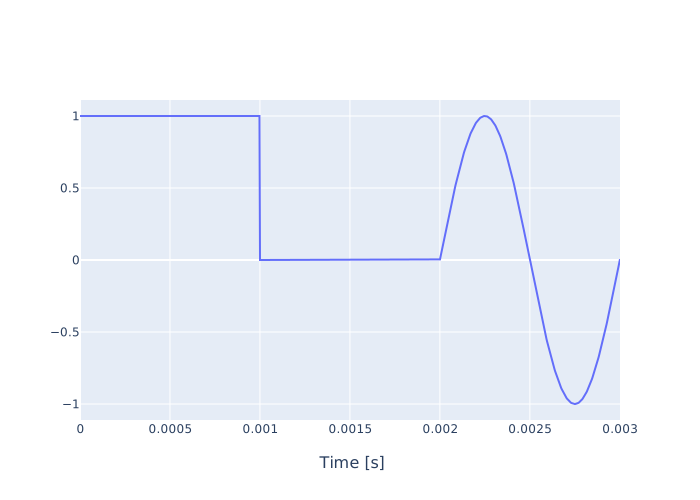
If you want to preview the waveform before playing, you can use a helper function called iplot:
iplot(chan_list=[my_chan])
Call run() to play the sequence:
ni_strmr.run()
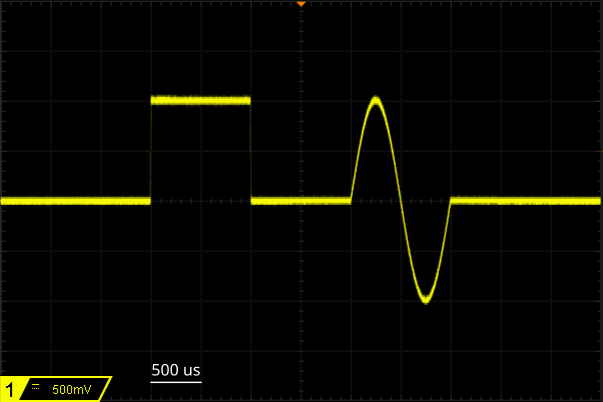
You should see the following signal:
Leaving safe#
Warning!
When idle, NI cards keep channels constant at the last output values.
In particular, when run is over, channels will keep whatever values they had last in the sequence. This can be dangerous. For instance, if this AO controls some magnet current, leaving a high value can lead to overheating. Always ensure that your sequence ends at safe values.
You can also perform hardware reset of all registered cards which sets all outputs to zero:
ni_strmr.reset_all()
Warning!
Sometimes zero may actually correspond to an "active" state and be unsafe if left behind.
More info?#
This was only a minimal demo to get you started. Subsequent tutorials cover more topics.
API reference contains full details. Docstring for each function can also be accessed directly in a notebook by using ?:
ni_strmr.compile?
Signature: ni_strmr.compile(stop_time: Optional[float] = None) -> float
Docstring:
Compiles the full pulse sequence from instructions in the current edit cache.

Args:
    stop_time: If ``None`` (default), the compiled sequence stops at the last instruction end.
        Specifying a later stop time extends the sequence duration.

Returns:
    The actual compiled stop time.

Raises:
    ValueError: if provided ``stop_time`` is below the last instruction end.

Notes:
    The actual stop times may vary between cards due to clock grid mismatch
    and extra ticks on the final closing edges. The returned value is the
    shortest run time across all cards.

    If explicit ``stop_time`` is provided, the additional time at the
    sequence end will be filled according to the usual rules:

    - Constant values after finite-duration instructions.
    - Continued waveforms after "go-this" instructions.
File:      c:\users\aa2-pc2\gh\nistreamer\nistreamer\py_api\nistreamer\streamer.py
Type:      method