Context Manager#
Note
You need one AO card and one DO card to run this tutorial.
Streamer setup#
from nistreamer import NIStreamer
from nistreamer.utils import iplot
# ⚠️ Adjust to match your setup ⚠️

ni_strmr = NIStreamer()

ao_card = ni_strmr.add_ao_card('Dev2', samp_rate=400e3)
do_card = ni_strmr.add_do_card('Dev3', samp_rate=10e6)

ao_0 = ao_card.add_chan(chan_idx=0)
do_0 = do_card.add_chan(port_idx=0, line_idx=0)

START_TRIG = 'RTSI0'
ao_card.start_trig_out = START_TRIG
do_card.start_trig_in = START_TRIG
ni_strmr.starts_last = ao_card.max_name
# Minimal demo sequence
ni_strmr.clear_edit_cache()
ao_0.sine(t=0, dur=100e-3, amp=1.0, freq=12.34)
do_0.high(t=50e-3, dur=150e-3)
ni_strmr.compile();
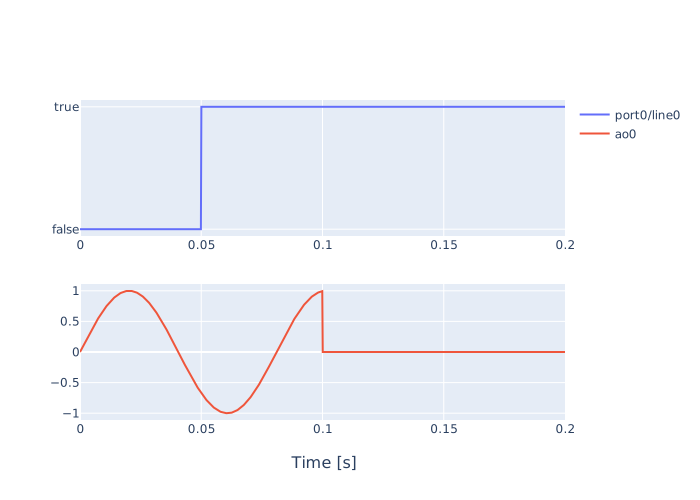
iplot(chan_list=[do_0, ao_0])
Context manager interface#
There are 2 types of stream control interfaces:
basic
runmethod;context manager API.
All previous tutorials used the basic approach:
ni_strmr.run()
A simplest example of context manager usage, equivalent to the above with run, looks like this:
with ni_strmr.init_stream() as handle:
    handle.launch()
    handle.wait_until_finished()
Breakdown:
with ni_strmr.init_stream() as handleinitializes the stream and assignsStreamHandleinstance tohandletarget.launch()starts the run. Note: this call is non-blocking and returns immediately.wait_until_finished()blocks script execution until the full waveform generation is finished.Stream is automatically closed and all resources are released when leaving the context block due to any reason.
See the full documentation in StreamHandle reference section.
Note
You should always call wait_until_finished every time you called launch.
Use cases#
Context manager interface is needed in several cases:
Custom logic between launches without re-init overhead;
Using the in-stream looping feature.
(1) Customizable repeat#
The basic run(nreps) method already allows to replay sequence efficiently. But in some cases, you may need to do custom operations before/after each repetition - send commands to other instruments, save data, and so on.
This is how you would do it using the basic run:
reps = 10
for _ in range(reps):
    # ... custom logic before ...
    ni_strmr.run(nreps=1)  # <-- not using repeat here
    # ... custom logic after ...
Although functional, it is inefficient - the whole stream is initialized from scratch for every repetition, which is very costly.
Context manager interface was exposed to address this issue. Let’s re-write the above example using it:
reps = 10
with ni_strmr.init_stream() as handle:
    for _ in range(reps):
        # ... custom logic before ...
        handle.launch()
        # ... custom logic during ...
        handle.wait_until_finished()
        # ... custom logic after ...
In this example, the stream is only initialized once - when entering the context - and all repetitions reuse it, avoiding the re-init overhead. This is how run(nreps) is actually implemented under the hood for efficient replay, but it does not allow adding custom code there.
Notice that you can even execute some logic during waveform playing - launch starts generation and returns immediately, so you can do something in parallel to streamer playing. Just don’t forget to call wait_until_finished() once your custom logic is done, even if you think the run has already finished.
(2) In-stream looping#
In all examples above we replayed the sequence by re-launching the stream multiple times. Re-launching incurs overhead (not as large as re-initializing from scratch, but noticeable) resulting in a fluctuating time gap between repetitions:
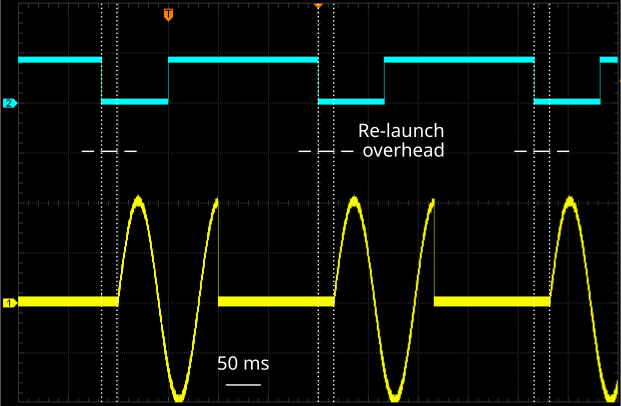
This is why a more advanced way of replaying is available - the in-stream looping feature. It is only exposed through launch(). Here is a minimal example:
with ni_strmr.init_stream() as handle:
    handle.launch(instream_reps=10)  # <-- notice this argument
    handle.wait_until_finished()
In-stream looping is very different from basic re-launching - all instream_reps iterations happen as a single continuous stream. As a result, the gap between subsequent repetitions is minimal and will not fluctuate:
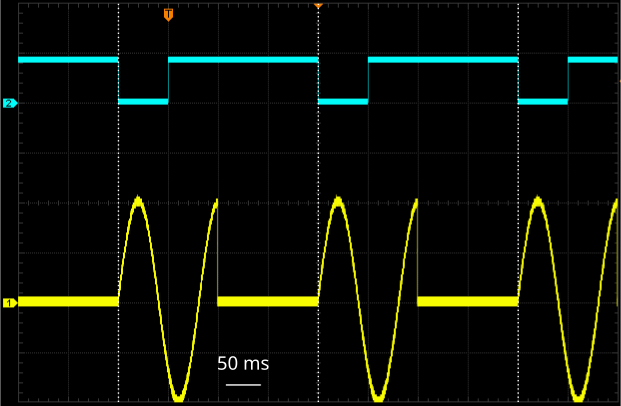
However, there are restrictions as compared to re-launching:
In-stream looping only works for sufficiently long sequences - a single repetition must exceed
chunksize_ms(seelaunch()docs). In contrast, repetitive re-launching can be used with any sequence duration.Start sync. You can use an external trigger to launch the in-stream loop, but once started, loop iterations will proceed without waiting. In contrast, each re-launch iteration can wait for a trigger to start.
Once launched, in-stream loop is running in the background, but there are ways to monitor and control it (refer to StreamHandle for full details).
Just like run(nreps), it can be stopped with KeyboardInterrupt and behaves similarly - generation stops after completing the current repetition in progress.
The following example shows how to print progress of a long-running loop with a large instream_reps:
instream_reps = 100

with ni_strmr.init_stream() as handle:
    handle.launch(instream_reps)

    while True:
        finished = handle.wait_until_finished(timeout=1)
        print(f'{handle.reps_written_count()} reps written out of {instream_reps}', end='\r')
        if finished:
            break
100 reps written out of 100
Here we are using wait_until_finished() with a finite timeout to periodically poll reps_written_count() until the run is finished.